
 English
As network scale and operational complexity continue to grow, switches have long evolved beyond being mere "simple connection" devices. They are now categorized into distinct types based on application scenarios, network architectures, and management requirements. Different switch types exhibit significant variations in performance, functionality, and design focus. This article provides an in-depth analysis of design philosophies, technical characteristics, and hierarchical structures across various deployment environments, offering comprehensive insights into the evolution and differentiation of these network core components to guide your network planning.
1. Campus Switches
Campus networks typically adopt a three-layer architecture, distributing complex network functions across layers to avoid performance bottlenecks and single-point failures caused by overburdening a single device. Campus switches serve as foundational equipment in environments like universities and corporate campuses.
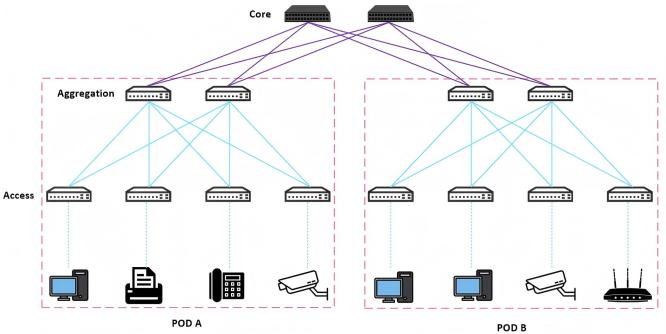
Three-layer Campus Network Architecture
1.1 Access Switches
Positioned at the outermost layer (access tier) of enterprise networks, access switches act as bridges for end-user connectivity. They prioritize plug-and-play simplicity, easy deployment, and maintenance to ensure seamless user access. High port density is critical to support concurrent terminal connections.
- Downlink Ports: Typically RJ45 copper ports (24/48 ports) with 10/100/1000M speeds, now increasingly upgraded to 2.5GBASE-T and 10GBASE-T. These connect end devices like PCs, printers, IP phones, wireless APs, cameras, and access control systems.
- Uplink Ports: Usually 1G SFP or 10G SFP+ optical ports (commonly 4 ports) for interconnection with aggregation switches.
- PoE Support: Many access switches support PoE/PoE+ functionality, enabling direct power delivery to devices like APs and cameras, thereby reducing cabling costs.
1.2 Aggregation Switches
The aggregation switch serves as the intermediate layer in enterprise networks, positioned at the aggregation layer within traditional three-layer network architectures. Situated between the access layer and core layer, it acts as a central hub for access layer traffic. Its primary functions include processing communication flows from access layer devices and providing uplink pathways to the core layer. Consequently, aggregation switches typically feature higher forwarding performance, stronger processing capabilities, and a more streamlined yet high-speed interface configuration.
- Uplink Ports: Typically 6~8x 100G QSFP28 ports for core switch uplinks.
- Downlink Ports: Often 48x 10G SFP+ or 25G SFP28 ports for access switch connections.
1.3 Core Switches
Core switches reside at the innermost layer of the campus network, serving as the backbone nodes of the entire network, these switches enable high-speed data forwarding between aggregation layers with redundant designs for high availability.
- Key Features: Ultra-high bandwidth, ultra-low latency, and robust reliability mechanisms to ensure continuous operation of the entire network.
- Port Configuration: Uniform high-capacity interfaces (e.g., 32~40x 100G QSFP28 ports)
| Category | Access Switch | Aggregation Switch | Core Switch |
|---|---|---|---|
| Core Function | End-user access | Traffic aggregation & policy enforcement | High-speed forwarding |
| Key Focus | High port density | Processing power | Ultra-low latency & throughput |
| Key Technologies | VLAN, PoE/PoE+ | Layer 3 routing, ACL, QoS | High-speed routing, redundancy (LACP) |
| Reliability | Standard | High | Extremely high |
| Deployment | Floor wiring closets | Regional/server rooms | Central data center |
2. Data Center Switches
Traditional three-tier network architectures are designed for scenarios with high north-south traffic and low east-west traffic, but modern data centers face surging east-west traffic. To address this, the Leaf-Spine architecture—with higher port density and scalability—has been widely adopted.
- North-South Traffic: External client-to-server traffic (e.g., web requests) or server-to-internet traffic.
- East-West Traffic: Internal server communication (e.g., database replication) or inter-data-center traffic (e.g., cloud synchronization).
2.1 Leaf Switches
Functioning similarly to access switches in traditional networks, Leaf switches directly connect servers and storage devices. However, they also serve as the L2/L3 boundary. This differs from traditional access switches.
- Analogy: Like an airport's boarding gates and security checkpoints, Leaf switches manage all mandatory traffic pathways for connected devices.
2.2 Spine Switches
As the backbone of the Leaf-Spine architecture, Spine switches use ECMP (Equal-Cost Multi-Path Routing) algorithms to dynamically distribute traffic across multiple paths, ensuring load balancing and redundancy.
Key Differences from Traditional Core Switches:
- East-West Traffic: Leaf-to-Leaf communication bypasses single-core reliance, leveraging parallel Spine paths.
- North-South Traffic: Edge switches route external traffic to core routers.
- Analogy: Like an airport's central shuttle system, Spines efficiently transport "passengers" (data packets) between "gates" (Leaf switches) without direct terminal connections.
2.3 Super-Spine Layer
For hyperscale data centers, the Super-Spine tier interconnects multiple PODs (Leaf-Spine clusters), enabling unified management and seamless scaling.
Role:
- Acts as a "network of networks," linking discrete PODs (each a self-contained Leaf-Spine unit).
- Optimizes traffic flow across geographically distributed or modular data centers.
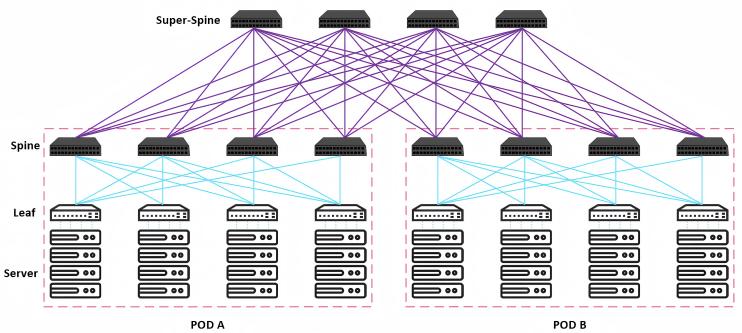
Super-Spine Network Architecture with Multi-POD Interconnection
3. SMB Switches
Small and medium-sized businesses (SMBs) with basic networking needs.
Key Features:
- Cost-Effective: Simplified design with support for common Layer 2 protocols.
- User-Friendly: Fanless for silent operation; Web GUI for easy management (ideal for non-IT staff).
- Scalability: Limited port counts (e.g., 8~24 ports) and throughput, but sufficient for SMBs.
- Typical Use Cases: Office networks, retail POS systems, small campus deployments.
4. Industrial Ethernet Switches
Design and component selection prioritize industrial application requirements.
Key Features:
- Extreme Durability: Operates in temperatures from -40°C to 75°C, resistant to dust, moisture, and EMI.
- Certifications: Often complies with industrial standards (e.g., IEEE 1613 for power grids, EN 50155 for rail).
- Redundancy: Supports protocols like PRP (Parallel Redundancy Protocol) for mission-critical systems.
- Applications: Factory automation, smart grids, traffic control systems.
5. Converged Switches
Unified Infrastructure: Combines voice, video, data, and IoT traffic on a single network.
Key Features:
- Resource Efficiency: Eliminates separate networks for different services.
- Simplified O&M: Centralized management for multiservice QoS (e.g., prioritizing VoIP over guest Wi-Fi).
- Deployment Scenarios: Hotels (IPTV + room control), universities (lecture streaming + IoT sensors).
- Technology Enablers: VLAN segmentation, policy-based routing.
6. Edge Switches
Deployed at the network perimeter near end-user devices. Their primary function is to provide local network access for computers, printers, IP phones, and similar equipment.
Key Features:
- Security: Built-in ACLs, MAC filtering, and optional firewall rules.
- PoE Support: Powers edge devices like IP cameras/Wi-Fi 6 APs.
- Traffic Control: Basic QoS for latency-sensitive applications (e.g., Zoom calls).
- Evolution: Increasingly integrated with SD-WAN/SASE for hybrid work models.


