
 English
As the backbone of data transmission, Ethernet cables underpin modern communication systems. They play an indispensable role in home networks, enterprise LANs and data centers. Even when using wireless Wi-Fi, the signal typically originates from a router connected via Ethernet cables. Thus, Ethernet cables have become an integral part of our daily lives.
I. What Is an Ethernet Cable?
An Ethernet cable is a network medium designed for stable, high-speed digital signal transmission between devices. Common devices like routers, switches, desktop computers, smart TVs, IP cameras, and gaming consoles—typically feature standard RJ45 ports. This interface combines mechanical stability with electrical performance, ensuring Ethernet cables maintain a central position in reliability, interference resistance, and transmission speed.
II. Ethernet Cable Types
2.1 Cat5
- Speed: 10/100 Mbps
- Application: Fast Ethernet environments, low-bandwidth scenarios
- Description: As the earliest widely adopted cable supporting 100 Mbps speeds, it was extensively used in early LAN deployments.
2.2 Cat5e (Enhanced)
- Speed: 1 Gbps (utilizes all 4 twisted pairs)
- Improvements: 100 MHz bandwidth, reduce crosstalk and improve signal integrity
- Ideal for: Modern home/small office networks
2.3 Cat6
- Speed: 1 Gbps, up to 250 MHz bandwidth
- Advantages: Better insulation materials, higher SNR, lower EMI
- Best for: Interference-heavy environments (e.g., near power lines or spaces with dense deployments of multiple devices)
2.4 Cat6A (Augmented)
- Speed: 10 Gbps over 100m, 500 MHz bandwidth
- Design: Often shielded (STP/FTP) for high-frequency stability.
- Ideal for: 10 Gigabit networks
2.5 Cat7
- Speed: 10 Gbps 100m, 600 MHz bandwidth
- Shielding: Individual shielded twisted pair (STP) construction
- Description: Each internal wire pair is individually shielded, with an additional outer layer of metal braiding providing dual or even triple protection.
- Note: ISO/IEC standard (not TIA-recognized)
2.6 Cat8
- Speed: 25–40 Gbps 20–30m, 2000 MHz bandwidth
- Use: High-density server room environments
- Shielding: Individual aluminum foil wrapping for each wire pair, with an external CCAM braided shielding layer for extreme EMI/RFI resistance.
-
Description: Fully backward compatible with all previous standards (Cat5 to Cat7).
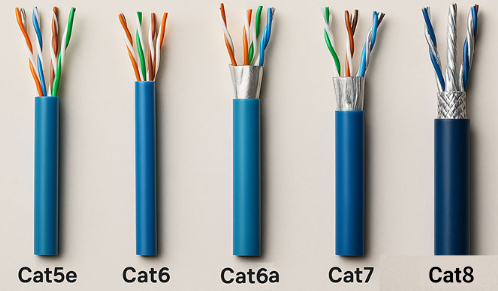
III. Cat5 vs Cat5E VS Cat6 vs Cat6A vs Cat7 vs Cat8
| Type | Speed | Bandwidth | Shielding | Wire Gauge | Jacket | Max Distance |
|---|---|---|---|---|---|---|
| Cat5 | 100 Mbps | 100 MHz | UTP | 24AWG | PVC | 100 m |
| Cat5e | 1 Gbps | 100 MHz | UTP | 24AWG | PVC | 100 m |
| Cat6 | 1 Gbps | 250 MHz | UTP/FTP | 24AWG | PVC CM | 100 m |
| Cat6A | 10 Gbps | 500 MHz | STP/FTP | 26AWG | PVC CM | 100 m |
| Cat7 | 10 Gbps | 600 MHz | SFTP | 26AWG | PVC CM | 100 m |
| Cat8 | 25–40 Gbps | 2000 MHz | SFTP | 28AWG | PVC CM | ≤30 m |
IV. Wire Scheme
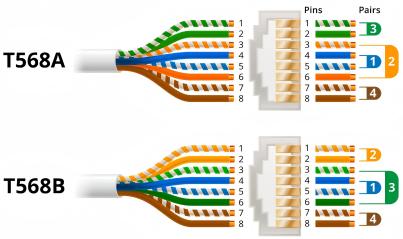
Ethernet cables follow two standard wire schemes: T568A and T568B, with T568B being the most widely used today. The key difference lies in the swapped positions of the green and orange wire pairs.
- Straight-through Cable: Both ends use the same standard (e.g., T568B-T568B). Used for communication between different devices (e.g., PC to switch).
-
Crossover Cable: One end uses T568A, the other T568B. Historically for direct connections between like devices (e.g., switch to switch). However, with modern auto-sensing ports, crossover cables are rarely needed.
V. Shielding Types of Network Cables
To address increasingly complex network transmission environments, Ethernet cables have evolved with four primary shielding structures:
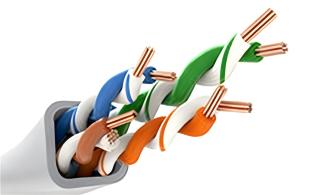
5.1 UTP (Unshielded Twisted Pair)
- Structure: Multiple twisted pairs without shielding.
- Advantages: Lowest cost, easy installation, high flexibility.
-
Use Cases: Homes and standard office networks.
5.2 FTP (Foiled Twisted Pair)
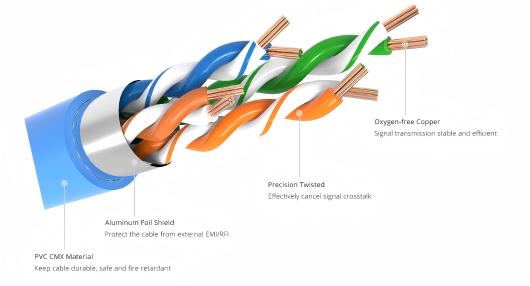
- Structure: Overall aluminum foil shield with drain wire (for grounding).
- Advantages: Better EMI/RFI protection than UTP when properly grounded.
-
Use Cases: Environments with moderate interference risks.
5.3 STP (Shielded Twisted Pair)
- Structure: Individual foil or braid shielding per pair or entire core.
- Advantages: Superior interference resistance.
-
Use Cases: Industrial/medical equipment wiring.
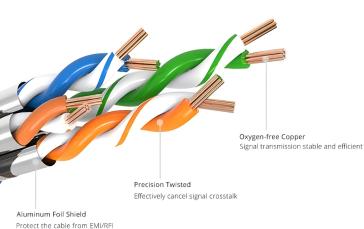
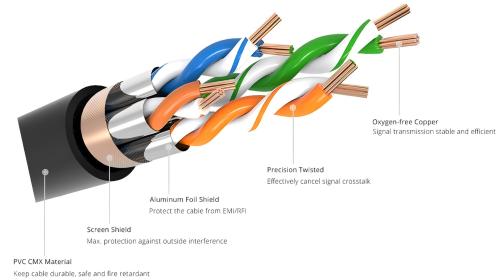
5.4 SFTP (Shielded Foiled Twisted Pair)
- Structure: Dual shielding (foil per pair with overall braided mesh).
- Advantages: Maximum noise immunity; enhanced security and confidentiality.
-
Use Cases: High-security or high-interference scenarios (e.g., data centers).
VI. How to Choose the Right Ethernet Cable
6.1 Define Requirements
- For basic use (web browsing, video streaming, office tasks): Cat5e/Cat6 suffice.
- For high-bandwidth applications (4K surveillance, NAS, virtualization, live gaming): Prioritize Cat6A/Cat7 for low latency and high throughput.
6.2 Future Scalability
Network tech evolves rapidly. To avoid costly rewiring for future upgrades (e.g., 10GbE networks, smart home hubs, private clouds system), opting for Cat6A/Cat7 upfront.
6.3 Budget
- Cost-Effective: Cat5e/Cat6 offer best value for most users.
- Premium Options: Shielded cables (Cat7/Cat8) and custom lengths cost more—justified only for professional/high-demand environments.
6.4 Purchase Channels
Always procure products from reputable brands through authorized channels to avoid counterfeit or substandard cables. Fake or low-quality cables often suffer from insufficient wire gauge, missing shielding, or poorly soldered RJ45 connectors, which can easily cause packet loss, reduced speeds, or even device damage.
VII. Precautions for Using Network Cables
- Avoid bending: Excessive bending or pulling can damage internal wires. Use cable clips or ties to secure and organize cables.
- Regular inspections: Periodically check the cable's exterior for signs of wear, damage, rodent bites, or loose connectors.
- Avoid high temperatures: Hot environments can degrade signal quality. Keep cables away from direct sunlight or high-temperature areas.
Though often overlooked, Ethernet cables are critical to network performance. Their quality and maintenance directly impact speed and stability. Selecting the right type and proper care can significantly enhance your network experience.


