
 English
In today's digital era, internet connectivity has become an indispensable part of our daily lives and work. However, issues with network speed and stability continue to trouble many users. Whether for home entertainment, remote work, or professional technical needs, improving network performance has become a key factor in enhancing quality of life. In this article, we will explore how to check current network speeds, analyze the main factors affecting performance, and propose effective hardware upgrade solutions to help you achieve a faster and more stable network experience.
1. How to Diagnose Your Home Network Speed
a.Open Windows Network Adapter Settings.
b.Double-click the current network adapter.
c.Check the connection speed of the adapter.
2. Why Your Internet is Slow: Common Bottlenecks
2.1 Limitations of Wi-Fi
While Wi-Fi is the most common way to access home networks, its physical properties make it difficult to compete with wired connections. Wireless signals weaken when passing through physical obstacles, with the degree of loss varying based on material composition. Additionally, interference from neighboring Wi-Fi networks, Bluetooth devices, and even microwaves can disrupt the signal. Since all wireless devices share the same channel, multiple active connections may also lead to bandwidth contention, reducing overall network efficiency.
2.2 Outdated Hardware
Old routers or computers equipped with low-speed Network Interface Cards (NICs) can create subtle bottlenecks. For example, a 100Mbps router or network card cannot handle broadband plans faster than 100Mbps, preventing you from utilizing the full potential of your high-speed internet service.
2.3 Poor-Quality Accessories
Low-quality Ethernet cables often fail to provide stable support for Gigabit transmission speeds. Additionally, if the cable length exceeds standard limits or the RJ45 connectors (crystal heads) are poorly crimped, the network speed will drop significantly—often capping at a mere 100Mbps.
3. Upgrading Network Hardware
3.1 USB 3.0 to Gigabit Ethernet Adapter
Many modern laptops sacrifice Ethernet ports for slim designs, forcing reliance on Wi-Fi. As previously discussed, wireless networks suffer from signal degradation. A USB 3.0 to Gigabit Ethernet adapter offers a practical solution:
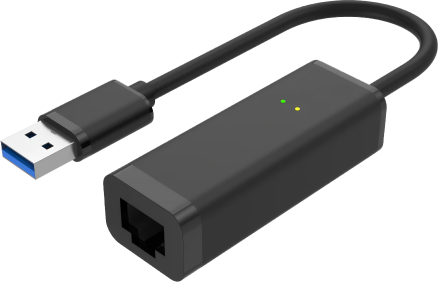
- Plug-and-play compatibility with Windows/macOS.
- Stable wired connection, eliminating Wi-Fi interference and reducing latency.
- Cost-effective for users needing reliable speeds without internal upgrades.
3.2 Ethernet Network Interface Card (NIC)
For desktops or NAS systems, upgrading to a dedicated Ethernet NIC delivers superior performance, especially for future-proof setups like fiber-optic home networks.
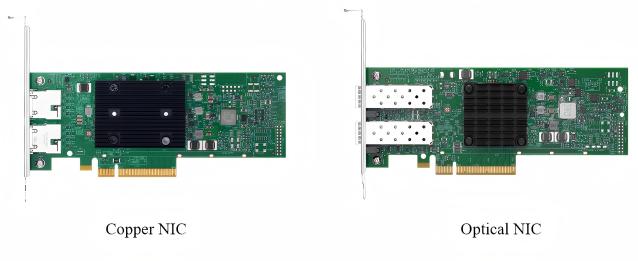
Key Advantages:
- Lower Latency: Direct PCB bus connection performs lower latency than USB adapters.
- Bandwidth Aggregation: Multi-port NICs with link aggregation technology can support double the bandwidth.
- Scalability: Auto-negotiation for compatibility with existing networks and can easily handle future broadband upgrades.
4. The Future of Home Networking: Private Fiber Optics
A private fiber optic network refers to a high-speed internal network that uses optical fiber instead of traditional copper Ethernet cables within a home. Unlike the "Fiber to the Home" (FTTH) service provided by ISPs, a private fiber network focuses on the interconnection between home devices—a concept also known as "Fiber to the Room" (FTTR) or "Fiber to the Desk" (FTTD).
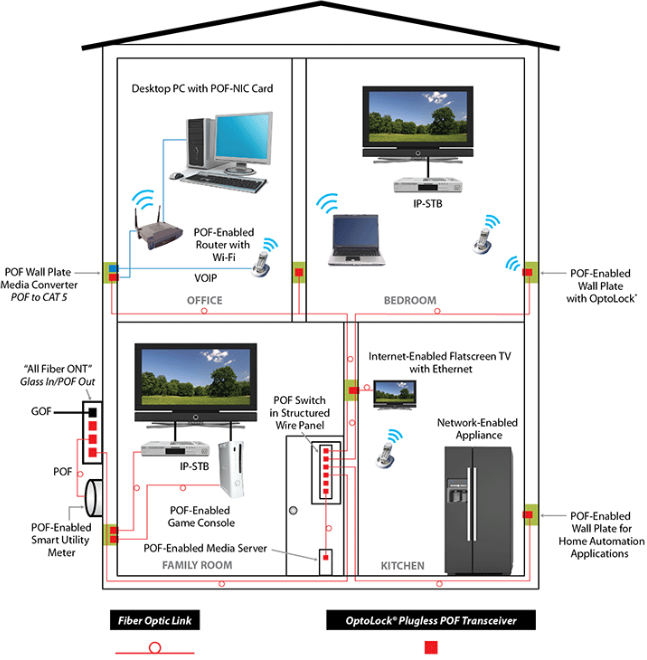
4.1 Core Advantages of Fiber Optic Networks
The benefits of fiber in a home environment go beyond immediate speed boosts; its true value lies in its future-proofing capabilities, categorized into four dimensions:
- Bandwidth: Fiber overcomes copper's physical limitations, effortlessly supporting speeds of 10Gbps and beyond. A single deployment meets years of upgrade demands.
- Stability: Since optical signals are immune to electromagnetic interference (EMI), signal integrity remains "pure" even in complex home appliance environments.
- Transmission Distance: Fiber exhibits extremely low signal attenuation, effortlessly solving long-distance cabling issues in multi-story residences and large-scale layouts.
- Latency: Fiber provides stable, microsecond-level latency that far surpasses copper, making it ideal for e-sports and other ultra-low-latency applications.
5. How to Upgrade Your Home Network
5.1 Fiber-Ready Devices
For devices that can be upgraded to fiber, such as a PC, you can replace a standard RJ45 Ethernet card with an SFP-interface fiber NICs. By installing a fiber NIC into a PCIe slot and inserting an optical module, the PC can connect directly to the home fiber backbone. This "Fiber to the Desktop" approach not only eliminates packet loss caused by electromagnetic interference but also significantly reduces the power consumption and heat generation of the network card. This is an ideal low-latency solution for workstations that require frequent NAS access or ultra-high-definition video editing.
5.2 Traditional RJ45 Devices
Since many devices still rely on standard RJ45 ports, a "Fiber Backbone + Copper Access" hybrid approach can be adopted. In this setup, fiber is used for the long-distance backbone to connect to a remote Ethernet switch or media converter, which then distributes the signal to terminal devices via standard Ethernet cables. This strategy enhances the capacity and anti-interference capability of the network backbone while maintaining compatibility with traditional hardware, balancing high performance with practical utility.
6.Conclusion
As the internet continues to evolve, home network performance has become a vital component of our quality of life. By checking your connection speed, analyzing potential bottlenecks, and implementing appropriate hardware upgrades, you can significantly enhance both the stability and speed of your home network.
The introduction of fiber optics, in particular, unlocks limitless future potential. From short-term bandwidth gains to long-term scalability, fiber is undoubtedly the premier choice for modern home network upgrades. Whether you are an e-sports enthusiast, a high-definition video editor, or or a regular home user, moving to fiber ensures a smoother and faster digital experience.


